
Home / Blog / NLP to SQL architecture for your Production Ready.
NLP to SQL architecture for your Production Ready.
Vithushan Sylvester
Chief Architect


At IdeaboxAI, As an AI startup we have firsthand experience in architecting solutions for various customer use cases. In fact, we find that 4 out of 5 such use cases directly or indirectly require the integration of Natural Language Processing (NLP) to generate SQL queries. We believe this is primarily because structured data sources have consistently dominated the market for several decades and you can’t just ignore them. One of the main challenges we have faced is moving from POC stage to productionizing these solution.
The very first article I wrote on this topic was published on April 9, 2023. It was as simple as a few shots prompting with schema names and the user’s question. Since then, a lot has changed. The dynamics of LLMs are more intelligent today than they used to be, and several techniques have started to evolve. The most common these days is the RAG based approach where you load the metadata into vector store. We have tested many of them in real-world data. Although the market demand is higher, 99.99% of the current “NLP to SQL” architectures that are being discussed today are still in the proof-of-concept stage. What I mean by that is, we can achieve 90% of the desired results in some common, well-structured demo dataset. However, the performance starts to decrease to around 50–60% when the moment we connect to a real-world ERP with complex schemas and relationships.
We burned our fingers, So you don’t have to!
Our refined architecture is designed to take you from a prototype to a production-ready, stable solution. So, let’s jump into it.
We can break it down to three main components
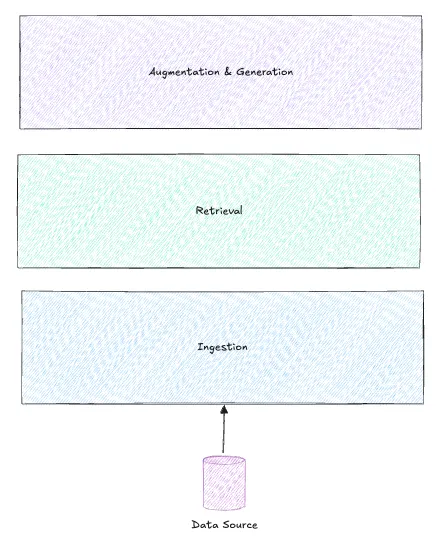
Step 01. Ingestion
As a first step, extracting the metadata and then loading them into a vector store or knowledge graph is a common approach. However, there are a few unique aspects to the ingestion process here.
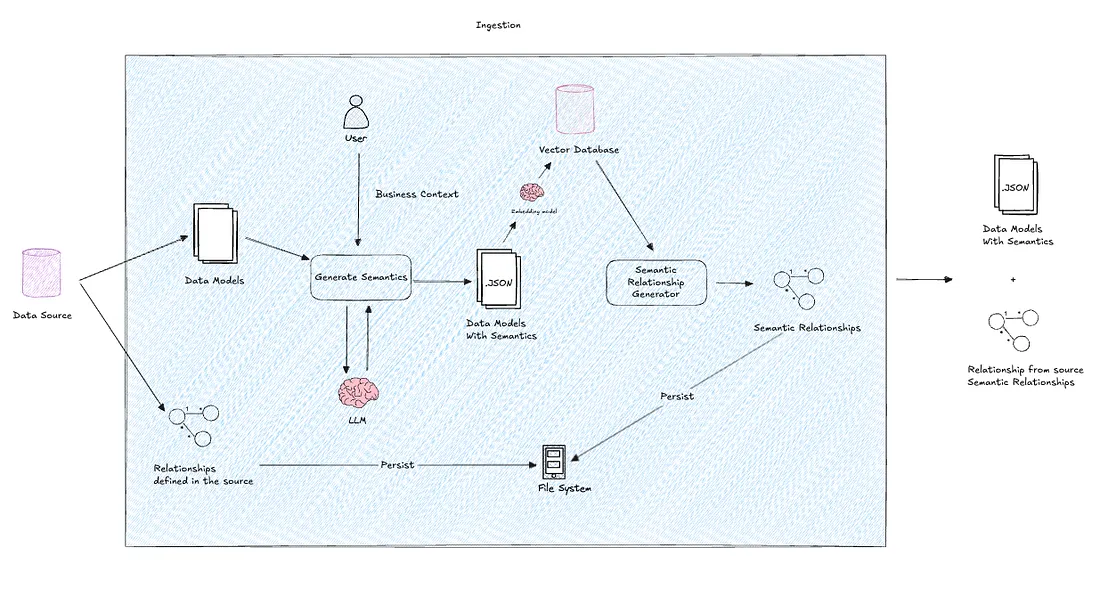 The flow here is,
Source -> Metadata -> Data Models -> Generate Semantics -> Generate Semantic Relationships -> Load the Models to Vector Store
It is crucial to maintain a data structure for the models that can be both semantically and programmatically utilized.
Not always, the metadata will inherently carry semantic meaning. Moreover, manually adding all table or column-level descriptions is not scalable. In such cases, we can harness the power of an LLM by crafting a concise prompt that encapsulates the business context.
You can load your models into a vector store, where you can later perform similarity searches using cosine similarity. However, when you load, the vector embeddings must capture some full meaningful information as an index. Therefore, we are treating one data model along with its semantics as one index. This will significantly reduce hallucination.
Not all the data sources you encounter will have established relationships. In real-life scenarios, the databases may appear as chaotic as no relationships. Using the power of vector analysis will assist you in establishing relationships by selecting similar indexes for each index (data model). Furthermore, employing an LLM on top of this will further enhance your ability to associate column-level relationships with the help of semantics.
Relationships can be either stored in knowledge graph or any preferred storage. But, in this case, we are using file system for faster retrieval
Below is an example of final outcome from this ingestion layer.
A Data Model (An index in the vector store)
{
  "name": "customer_order",
  "database": "customer_db",
  "columns": [
    {
      "name": "OrderId",
      "type": "INT",
      "notNull": 1,
      "properties": {
        "description": "Unique identifier for each customer order in the system.",
        "displayName": "OrderId"
      }
    },
    {
      "name": "CustomerId",
      "type": "INT",
      "notNull": 1,
      "properties": {
        "description": "Links the order to the respective customer from the customer master table.",
        "displayName": "CustomerId"
      }
    },
    {
      "name": "OrderDate",
      "type": "DATETIME",
      "notNull": 1,
      "properties": {
        "description": "The date and time when the order was placed by the customer.",
        "displayName": "OrderDate"
      }
    },
    {
      "name": "OrderStatus",
      "type": "VARCHAR",
      "notNull": 1,
      "properties": {
        "description": "Current status of the order (e.g., Pending, Confirmed, Shipped, Delivered).",
        "displayName": "OrderStatus"
      }
    },
    {
      "name": "TotalAmount",
      "type": "DECIMAL(12,2)",
      "notNull": 1,
      "properties": {
        "description": "The total monetary value of the order before taxes and shipping.",
        "displayName": "TotalAmount"
      }
    },
    {
      "name": "Currency",
      "type": "VARCHAR",
      "notNull": 1,
      "properties": {
        "description": "Currency used for this particular order, aligning with the customer's preferred currency.",
        "displayName": "Currency"
      }
    },
    {
      "name": "PaymentStatus",
      "type": "VARCHAR",
      "notNull": 1,
      "properties": {
        "description": "Indicates whether the order is Paid, Partially Paid, or Unpaid.",
        "displayName": "PaymentStatus"
      }
    },
    {
      "name": "ShippingAddress",
      "type": "VARCHAR",
      "notNull": 1,
      "properties": {
        "description": "Address where the order is to be delivered.",
        "displayName": "ShippingAddress"
      }
    },
    {
      "name": "ShippingTerms",
      "type": "VARCHAR",
      "notNull": 1,
      "properties": {
        "description": "Defines the agreed shipping conditions for the order.",
        "displayName": "ShippingTerms"
      }
    },
    {
      "name": "EstimatedDeliveryDate",
      "type": "DATETIME",
      "notNull": 0,
      "properties": {
        "description": "Estimated date and time by which the order is expected to be delivered.",
        "displayName": "EstimatedDeliveryDate"
      }
    },
    {
      "name": "CreatedAt",
      "type": "DATETIME",
      "notNull": 1,
      "properties": {
        "description": "Timestamp when the order record was created.",
        "displayName": "CreatedAt"
      }
    },
    {
      "name": "CreatedUser",
      "type": "VARCHAR",
      "notNull": 1,
      "properties": {
        "description": "User who created the order record.",
        "displayName": "CreatedUser"
      }
    },
    {
      "name": "UpdatedAt",
      "type": "DATETIME",
      "notNull": 0,
      "properties": {
        "description": "Timestamp of the last update to the order.",
        "displayName": "UpdatedAt"
      }
    },
    {
      "name": "UpdatedUser",
      "type": "VARCHAR",
      "notNull": 0,
      "properties": {
        "description": "User who last updated the order.",
        "displayName": "UpdatedUser"
      }
    },
    {
      "name": "VersionFlag",
      "type": "INT",
      "notNull": 1,
      "properties": {
        "description": "Indicates the version of the order data for tracking updates.",
        "displayName": "VersionFlag"
      }
    }
  ],
  "refreshTime": "2025-05-13T00:00:00.000000",
  "properties": {
    "description": "Captures order-level details for each customer transaction, including status, payment, and shipping information.",
    "displayName": "customer_order",
    "database": "customer_db"
  }
}
A Relationship
{
    "name": "CustomerToCustomerOrder",
    "models": [
        "customer",
        "customer_order"
    ],
    "joinType": "ONE_TO_MANY",
    "condition": "customer.id = customer_order.customer"
}
Below is an example of the ingestion code.
import os
import json
from dotenv import load_dotenv
from pathlib import Path
import datetime
from sqlalchemy import create_engine, inspect, text
from sqlalchemy.engine import URL
import openai
load_dotenv()
Configure OpenAI
openai.api_key = os.getenv("OPENAI_API_KEY")
class DatabaseIngestion:
def init(self, database_tables=None, business_context=None):
db_type = os.getenv("DATASOURCE_TYPE", "mysql").lower()
self.database_tables = database_tables or []
self.business_context = business_context
if db_type == "mysql":
self.connection_url_template = URL.create(
"mysql+mysqlconnector",
username=os.getenv("DB_USER"),
password=os.getenv("DB_PASS"),
host=os.getenv("DB_HOST"),
port=int(os.getenv("DB_PORT")),
database=None,
)
# Create cache directories if they don't exist
self.base_path = Path("fs_cache")
self.models_path = self.base_path / "models"
self.relationships_path = self.base_path / "relationships"
self.models_path.mkdir(parents=True, exist_ok=True)
self.relationships_path.mkdir(parents=True, exist_ok=True)
def connect_to_database(self, database_name):
# Create a new connection URL for the specific database
connection_url = self.connection_url_template.set(database=database_name)
# Create new engine and inspector for this database
self.engine = create_engine(connection_url)
self.inspector = inspect(self.engine)
def get_tables(self):
if self.database_tables:
# Return only the specified tables for the current database
current_db = self.engine.url.database
return [table for db, table in self.database_tables if db == current_db]
return self.inspector.get_table_names()
def get_columns(self, table_name):
columns = []
try:
# First try the normal inspector method
columns = self._get_columns_from_inspector(table_name)
except Exception:
# If that fails (e.g., for views), try using information_schema
columns = self._get_columns_from_information_schema(table_name)
return columns
def _get_columns_from_inspector(self, table_name):
columns = []
for column in self.inspector.get_columns(table_name):
col_info = {
"COLUMN_NAME": column["name"],
"DATA_TYPE": str(column["type"]),
"IS_NULLABLE": "YES" if column.get("nullable") else "NO",
"COLUMN_KEY": (
"PRI" if self.is_primary_key(table_name, column["name"]) else ""
),
}
columns.append(col_info)
return columns
def _get_columns_from_information_schema(self, table_name):
columns = []
query = text(
SELECT
COLUMN_NAME,
DATA_TYPE,
IS_NULLABLE,
COLUMN_KEY
FROM information_schema.COLUMNS
WHERE TABLE_SCHEMA = :database
AND TABLE_NAME = :table_name
ORDER BY ORDINAL_POSITION
)
with self.engine.connect() as connection:
result = connection.execute(
query, {"database": self.engine.url.database, "table_name": table_name}
)
for row in result:
col_info = {
"COLUMN_NAME": row.COLUMN_NAME,
"DATA_TYPE": row.DATA_TYPE,
"IS_NULLABLE": row.IS_NULLABLE,
"COLUMN_KEY": row.COLUMN_KEY or "",
}
columns.append(col_info)
return columns
def is_primary_key(self, table_name, column_name):
try:
# First try the normal inspector method
pk_columns = self.inspector.get_pk_constraint(table_name)[
"constrained_columns"
]
return column_name in pk_columns
except Exception:
# If that fails, try using information_schema
query = text(
"""
SELECT COUNT(*) as is_pk
FROM information_schema.KEY_COLUMN_USAGE
WHERE TABLE_SCHEMA = :database
AND TABLE_NAME = :table_name
AND COLUMN_NAME = :column_name
AND CONSTRAINT_NAME = 'PRIMARY'
"""
)
with self.engine.connect() as connection:
result = connection.execute(
query,
{
"database": self.engine.url.database,
"table_name": table_name,
"column_name": column_name,
},
).scalar()
return bool(result)
def get_relationships(self):
relationships = []
try:
# First try the normal inspector method
for table_name in self.get_tables():
for fk in self.inspector.get_foreign_keys(table_name):
relationship = {
"TABLE_NAME": table_name,
"COLUMN_NAME": fk["constrained_columns"][0],
"REFERENCED_TABLE_NAME": fk["referred_table"],
"REFERENCED_COLUMN_NAME": fk["referred_columns"][0],
}
relationships.append(relationship)
except Exception:
# If that fails, try using information_schema
query = text(
"""
SELECT
TABLE_NAME,
COLUMN_NAME,
REFERENCED_TABLE_NAME,
REFERENCED_COLUMN_NAME
FROM information_schema.KEY_COLUMN_USAGE
WHERE TABLE_SCHEMA = :database
AND REFERENCED_TABLE_NAME IS NOT NULL
"""
)
with self.engine.connect() as connection:
result = connection.execute(
query, {"database": self.engine.url.database}
)
for row in result:
relationship = {
"TABLE_NAME": row.TABLE_NAME,
"COLUMN_NAME": row.COLUMN_NAME,
"REFERENCED_TABLE_NAME": row.REFERENCED_TABLE_NAME,
"REFERENCED_COLUMN_NAME": row.REFERENCED_COLUMN_NAME,
}
relationships.append(relationship)
return relationships
def generate_column_description(self, table_name, column_name, data_type):
"""Generate column description using OpenAI GPT"""
if not self.business_context:
return f"Column {column_name} in table {table_name}"
prompt = f"""
Based on this business context:
{self.business_context}
Generate a brief (max 10-15 words) business description for this database column:
Table: {table_name}
Column: {column_name}
Data Type: {data_type}
Description should explain the business purpose of this column.
"""
try:
response = openai.chat.completions.create(
model="gpt-4o-mini",
messages=[
{
"role": "system",
"content": "You are a technical documentation expert who writes clear, concise database column descriptions.",
},
{"role": "user", "content": prompt},
],
max_tokens=50,
temperature=0.3,
)
return response.choices[0].message.content.strip()
except Exception as e:
print(
f"Warning: Could not generate description for {column_name}: {str(e)}"
)
return f"Column {column_name} in table {table_name}"
def generate_table_description(self, table_name):
"""Generate table description using OpenAI GPT"""
if not self.business_context:
return f"Table containing {table_name} data"
prompt = f"""
Based on this business context:
{self.business_context}
Generate a brief (max 10-15 words) technical description for this database table:
Table Name: {table_name}
Description should explain the business purpose of this table.
"""
try:
response = openai.chat.completions.create(
model="gpt-4o-mini",
messages=[
{
"role": "system",
"content": "You are a technical documentation expert who writes clear, concise database table descriptions.",
},
{"role": "user", "content": prompt},
],
max_tokens=50,
temperature=0.0,
)
return response.choices[0].message.content.strip()
except Exception as e:
print(
f"Warning: Could not generate description for table {table_name}: {str(e)}"
)
return f"Table containing {table_name} data"
def generate_model_json(self, table_name, columns):
model = {
"name": table_name,
"database": self.engine.url.database,
"columns": [],
"refreshTime": datetime.datetime.now().isoformat(),
"properties": {
"description": self.generate_table_description(table_name),
"displayName": table_name,
"database": self.engine.url.database,
},
}
for column in columns:
column_name = column["COLUMN_NAME"]
data_type = column["DATA_TYPE"]
column_info = {
"name": column_name,
"type": data_type.upper(),
"notNull": 1 if column["IS_NULLABLE"] == "NO" else 0,
"properties": {
"description": self.generate_column_description(
table_name, column_name, data_type
),
"displayName": column_name,
},
}
if column["COLUMN_KEY"] == "PRI":
model["primaryKey"] = column_name
model["columns"].append(column_info)
return model
def generate_relationship_json(self, relationship):
return {
"name": f"{relationship['TABLE_NAME']}_{relationship['REFERENCED_TABLE_NAME']}_Relation",
"models": [
relationship["TABLE_NAME"],
relationship["REFERENCED_TABLE_NAME"],
],
"joinType": "ONE_TO_MANY",
"condition": f"{relationship['REFERENCED_TABLE_NAME']}.{relationship['REFERENCED_COLUMN_NAME']} = {relationship['TABLE_NAME']}.{relationship['COLUMN_NAME']}",
}
def process(self):
if not self.database_tables:
# If no specific tables provided, use default behavior
self.connect_to_database(os.getenv("DB_NAME"))
tables = self.get_tables()
self.process_tables(tables)
else:
# Process each database and its tables
processed_dbs = set()
for db_name, table in self.database_tables:
if db_name not in processed_dbs:
self.connect_to_database(db_name)
processed_dbs.add(db_name)
columns = self.get_columns(table)
model_json = self.generate_model_json(table, columns)
with open(self.models_path / f"{db_name}{table}.json", "w") as f:
json.dump(model_json, f, indent=4)
# Process relationships after all tables are processed
self._process_relationships()
def _process_relationships(self):
# Process relationships for each database
processed_dbs = set()
for db_name, _ in self.database_tables:
if db_name not in processed_dbs:
self.connect_to_database(db_name)
processed_dbs.add(db_name)
relationships = self.get_relationships()
for idx, rel in enumerate(relationships):
# Only process relationships if both tables are in our filter
if self._is_relationship_relevant(rel):
relationship_json = self.generate_relationship_json(rel)
with open(
self.relationships_path
/ f"{db_name}relationship{idx+1}.json",
"w",
) as f:
json.dump(relationship_json, f, indent=4)
def _is_relationship_relevant(self, relationship):
# Check if both tables in the relationship are in our filtered list
table_pairs = [(db, table) for db, table in self.database_tables]
return any(
(db, relationship["TABLE_NAME"]) in table_pairs
for db in {pair[0] for pair in table_pairs}
) and any(
(db, relationship["REFERENCED_TABLE_NAME"]) in table_pairs
for db in {pair[0] for pair in table_pairs}
)
def close(self):
if hasattr(self, "engine"):
self.engine.dispose()
if name == "main":
# Example business context
semantic_prompts = """
This is a online store where, the shop sell PC hardware. The customers are from various locations and the orders are being tracked in the source database attached here
# add the tables you would like to ingest here
database_tables = [
("customer_db", "customer_order"),
("customer_db", "customer"),
]
try:
ingestion = DatabaseIngestion(database_tables, semantic_prompts)
ingestion.process()
print("Ingestion completed successfully!")
except Exception as e:
print(f"Error during ingestion: {str(e)}")
finally:
ingestion.close()
Here, the source is MySQL. But this could be any sql source. you may just tweak the connection to your preferred source.
The following code is an example of semantic relationship generation,
import json
from pathlib import Path
import openai
from vector_index import ModelVectorIndex
from dotenv import load_dotenv
import os
load_dotenv()
openai.api_key = os.getenv("OPENAI_API_KEY")
class SemanticRelationshipGenerator:
def init(self, models_path: str = "fs_cache/models"):
self.models_path = Path(models_path)
self.vector_index = ModelVectorIndex()
self.index = self.vector_index.load_index()
def get_model_files(self):
"""Get all model files from the models directory"""
return list(self.models_path.glob("*.json"))
def generate_relationship_prompt(self, current_model, related_models):
"""Generate a prompt for the LLM to create relationships"""
return f"""
Based on the following database models, generate potential relationships in JSON format.
Focus on identifying meaningful business relationships between these tables.
Current Model:
{json.dumps(current_model)}
Related Models:
{json.dumps(related_models)}
Generate relationships in the following format:
{{
"name": "RelationshipName",
"models": ["Table1", "Table2"],
"joinType": "ONE_TO_MANY" or "MANY_TO_MANY",
"condition": "Table1.column = Table2.column"
}}
Consider:
- Primary and foreign key relationships
- Business logic connections
- Common fields that could be used for joins
- The nature of the relationship (one-to-many, many-to-many)
Return only the JSON object, no additional text.
"""
def process_models(self):
"""Process each model and generate relationships"""
model_files = self.get_model_files()
all_relationships = []
for model_file in model_files:
try:
with open(model_file, "r", encoding="utf-8") as f:
current_model = json.load(f)
# Search for related models using vector similarity
query = f"Find tables related to {current_model['name']}"
try:
results = self.index.similarity_search_with_score(query, k=3)
except Exception as e:
print(f"Error in vector search for {model_file.name}: {str(e)}")
# Try to rebuild the index
self.index = self.vector_index.build_index()
results = self.index.similarity_search_with_score(query, k=3)
related_models = []
for doc, _ in results:
try:
related_model = json.loads(doc.page_content)
related_models.append(related_model)
# print(related_model)
except json.JSONDecodeError:
print(
f"Warning: Could not parse related model from vector store for {model_file.name}"
)
continue
if not related_models:
print(f"Warning: No related models found for {model_file.name}")
continue
# Generate relationships using LLM
prompt = self.generate_relationship_prompt(
current_model, related_models
)
try:
response = openai.chat.completions.create(
model="gpt-4o-mini",
messages=[
{
"role": "system",
"content": "You are a database relationship expert who generates accurate and meaningful table relationships.",
},
{"role": "user", "content": prompt},
],
temperature=0.3,
max_tokens=500,
timeout=30,
)
response_content = response.choices[0].message.content.strip()
# Debug logging
print(f"\nResponse for {model_file.name}:")
print(response_content)
# Check for empty response
if not response_content:
print(
f"Warning: Empty response received for {model_file.name}"
)
continue
# Try to clean the response if it's not valid JSON
try:
# Parse the response - handle both single object and array
relationships = json.loads(response_content)
except json.JSONDecodeError:
# Try to clean the response by removing any markdown formatting
cleaned_content = response_content.strip("`").strip()
if cleaned_content.startswith("json"):
cleaned_content = cleaned_content[4:].strip()
try:
relationships = json.loads(cleaned_content)
except json.JSONDecodeError as e:
print(
f"Error parsing LLM response for {model_file.name}: {str(e)}\n"
f"Response content: {response_content[:200]}..." # Show first 200 chars
)
continue
if isinstance(relationships, list):
all_relationships.extend(relationships)
else:
all_relationships.append(relationships)
print(f"Successfully processed {model_file.name}")
except openai.APITimeoutError:
print(f"Timeout processing {model_file.name}, retrying...")
continue
except json.JSONDecodeError as e:
print(
f"Error parsing LLM response for {model_file.name}: {str(e)}"
)
continue
except Exception as e:
print(
f"Error processing {model_file.name} with OpenAI: {str(e)}"
)
continue
except json.JSONDecodeError:
print(f"Error: Could not parse {model_file.name}")
continue
except Exception as e:
print(f"Unexpected error processing {model_file.name}: {str(e)}")
continue
return all_relationships
def save_relationships(
self, relationships, output_path: str = "fs_cache/relationships"
):
"""Save generated relationships to JSON files"""
output_path = Path(output_path)
output_path.mkdir(parents=True, exist_ok=True)
for idx, relationship in enumerate(relationships):
with open(output_path / f"semantic_relationship_{idx+1}.json", "w") as f:
json.dump(relationship, f, indent=4)
def main():
generator = SemanticRelationshipGenerator()
relationships = generator.process_models()
generator.save_relationships(relationships)
print(f"Generated {len(relationships)} relationships")
if name == "main":
main()
Step 02. Retrieval
Most of the approaches we’ve encountered have used the user’s question or regenerated question as a query to perform semantic search retrieval from the vector store, which is not incorrect. However, the only missing aspect is the lack of context for all the steps involved in arriving at that answer. Consequently, some potential data models could be overlooked during the retrieval process. we assume, this is due to lack of words which can make that cosine similarity.
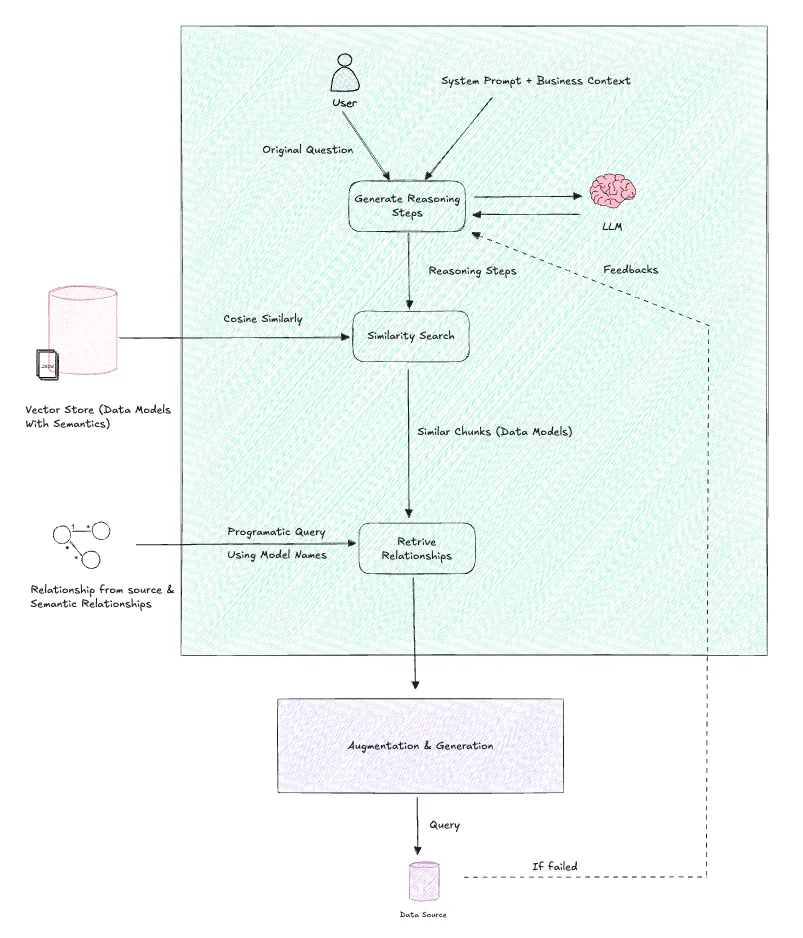 To overcome the limitations of common retrieval patterns, we have implemented the following techniques.
Leverage the capabilities of an LLM powered AI agent to dissect the problem and elucidate the reasoning steps involved. This approach can yield more precise results when adding a business context into the prompt, in conjunction with the user’s query when generating reasoning steps.
Since the retrieved similar indexes were stored as JSON of the complete data model, they can now be programmatically understood. We can use them to query the relevant relationships by matching the data model names.
Following the SQL generation and execution based on the retrieved data models and relationships, this process can be iterated with feedback whenever there are any errors. This will enable better reasoning and retrieval in the future.
Following is an example python code for retrieval,
from vector_index import ModelVectorIndex
from pathlib import Path
def get_db_context(reasoning_steps: str) -> str:
    """
    Generate SQL query based on natural language question using semantic context and table relationships.
    Args:
        reasoning_steps: The reasoning steps to beak down the solution for user's question
    Returns:
        str: Generated SQL query
    """
    try:
        # Initialize vector index
        vector_index = ModelVectorIndex()
        index = vector_index.load_index("fs_cache/vector_index")
        # Load relationships
        relationships_path = Path("fs_cache/relationships")
        relationships = []
        for file_path in relationships_path.glob("*.json"):
            with open(file_path, "r") as f:
                relationships.append(json.load(f))
        docs_and_scores = index.similarity_search_with_score(reasoning_steps, k=5)
        similarity_threshold = 1.6
        relevant_docs = [doc for doc, score in docs_and_scores if score <= similarity_threshold]
        models = [json.loads(doc.page_content) for doc in relevant_docs]
        grouped = []
        for model in models:
            model_name = model["name"]
            related_rels = [
                rel for rel in relationships
                if model_name in rel.get("models", [])
            ]
            grouped.append({
                "model": model,
                "relationships": related_rels
            })
        return grouped
    except Exception as e:
        raise e
Step 03. Augmentation & Generation
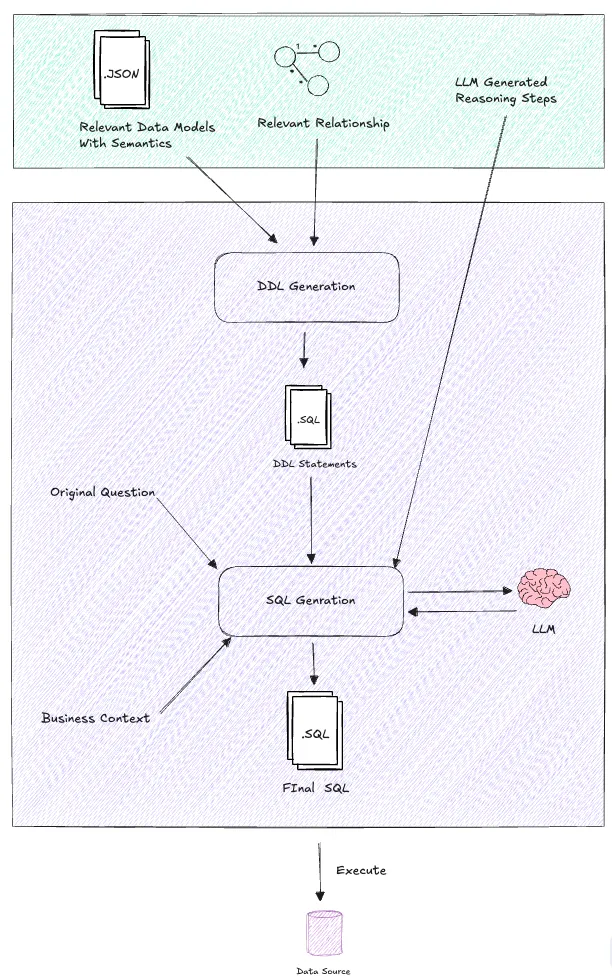 This is where the Agent will play a pivotal role.
We can seamlessly combine the agent and our retrieval capabilities by utilizing the tool calls (function calling) to enable more natural and human-like problem-solving abilities.
The tools employed in this process include,
generate_sql_query: This tool augments the retrieval results and generates SQL based on those results.
execute_sql_query: This tool executes the SQL query and retrieves the results.
generate_sql_query
Looking at the breakdown of this tool, it performs three distinct actions to make the whole thing work.
Retrieval
This involves retrieving relevant chunks (data models) and their relationships. (The code for this is attached in the Retrieval section above.)
Augmentation
Since LLMs tend to hallucinate over longer tokens and confuse structures, it’s always better to stick to a compact and informative format. In the context of SQL, DDLs are particularly informative because they can pack all the information we’re looking for into a concise format. Below is an example of such a DDL structure,
-- Table: customer_db.customer
-- Description: Stores master information about customers.
CREATE TABLE customer_db.customer (
    CustomerId INT NOT NULL, -- Unique identifier for each customer. Renamed from 'id' for consistency.
    CustomerName VARCHAR(255) NOT NULL, -- Name of the customer.
    Email VARCHAR(255) UNIQUE, -- Email address of the customer, should be unique.
    PhoneNumber VARCHAR(50), -- Phone number of the customer.
    BillingAddress VARCHAR(500) NOT NULL, -- Billing address of the customer.
    IsActive TINYINT NOT NULL DEFAULT 1, -- Indicates if the customer account is active (1) or inactive (0).
    CreatedAt DATETIME NOT NULL, -- Timestamp when the customer record was created.
    CreatedUser VARCHAR(100) NOT NULL, -- User who created the customer record.
    UpdatedAt DATETIME, -- Timestamp of the last update to the customer record.
    UpdatedUser VARCHAR(100), -- User who last updated the customer record.
    VersionFlag INT NOT NULL DEFAULT 1, -- Indicates the version of the customer data for tracking updates.
    PRIMARY KEY (CustomerId)
);
-- Table: customer_db.customer_order
-- Description: Captures order-level details for each customer transaction, including status, payment, and shipping information.
CREATE TABLE customer_db.customer_order (
OrderId INT NOT NULL, -- Unique identifier for each customer order in the system.
CustomerId INT NOT NULL, -- Links the order to the respective customer from the customer master table.
OrderDate DATETIME NOT NULL, -- The date and time when the order was placed by the customer.
OrderStatus VARCHAR(50) NOT NULL, -- Current status of the order (e.g., Pending, Confirmed, Shipped, Delivered).
TotalAmount DECIMAL(12,2) NOT NULL, -- The total monetary value of the order before taxes and shipping.
Currency VARCHAR(10) NOT NULL, -- Currency used for this particular order, aligning with the customer's preferred currency.
PaymentStatus VARCHAR(50) NOT NULL, -- Indicates whether the order is Paid, Partially Paid, or Unpaid.
ShippingAddress VARCHAR(500) NOT NULL, -- Address where the order is to be delivered.
ShippingTerms VARCHAR(100) NOT NULL, -- Defines the agreed shipping conditions for the order.
EstimatedDeliveryDate DATETIME, -- Estimated date and time by which the order is expected to be delivered.
CreatedAt DATETIME NOT NULL, -- Timestamp when the order record was created.
CreatedUser VARCHAR(100) NOT NULL, -- User who created the order record.
UpdatedAt DATETIME, -- Timestamp of the last update to the order.
UpdatedUser VARCHAR(100), -- User who last updated the order.
VersionFlag INT NOT NULL, -- Indicates the version of the order data for tracking updates.
PRIMARY KEY (OrderId)
);
-- Foreign Key Constraints
-- Relationship: CustomerToCustomerOrder (ONE_TO_MANY)
-- customer.CustomerId = customer_order.CustomerId
ALTER TABLE customer_db.customer_order
ADD FOREIGN KEY (CustomerId) REFERENCES customer_db.customer(CustomerId);
In this example, we can observe the table structure, table description, columns with their data types, column descriptions, null conditions, relationships, and the database name. That’s essentially all we require.
In fact, we obtain the data models and their relationships in JSON during the retrieval process. This simplifies the task of generating DDLs programmatically. Of course, we can utilize an LLM for this purpose. However, adopting a programmatic approach whenever feasible significantly speeds up the entire framework, reducing the number of API calls to the LLM. Below is an example code of how we generate DDLs from the retrieval results,
def generate_ddl_for_models_and_relationships(model_relationships):
# Build a lookup for model name -> (db, columns)
model_lookup = {}
for entry in model_relationships:
model = entry["model"]
model_lookup[model["name"]] = {
"db": model["database"],
"columns": {col["name"]: col for col in model["columns"]},
}
ddls = []
for entry in model_relationships:
model = entry["model"]
table_name = model["name"]
db_name = model["database"]
columns = model["columns"]
table_desc = model.get("properties", {}).get("description", "")
pk_candidates = [
col["name"]
for col in columns
if col["name"].lower().endswith("id") and col.get("notNull", 0)
]
# Compose DDL
ddl_lines = []
ddl_lines.append(f"-- Table: {db_name}.{table_name}")
if table_desc:
ddl_lines.append(f"-- Description: {table_desc}")
ddl_lines.append(f"CREATE TABLE {db_name}.{table_name} (")
col_lines = []
for col in columns:
col_name = col["name"]
col_type = col["type"]
not_null = "NOT NULL" if col.get("notNull", 0) else ""
desc = col.get("properties", {}).get("description", "")
comment = f" -- {desc}" if desc else ""
col_lines.append(f"    {col_name} {col_type} {not_null}{comment}".rstrip())
# Add primary key if any
if pk_candidates:
pk = pk_candidates[0]
col_lines.append(f"    ,PRIMARY KEY ({pk})")
ddl_lines.append(",\n".join(col_lines))
ddl_lines.append(");")
ddls.append("\n".join(ddl_lines))
# Now generate foreign key constraints
fk_lines = []
for entry in model_relationships:
relationships = entry.get("relationships", [])
for rel in relationships:
# Parse the join condition: "table1.col1 = table2.col2"
cond = rel.get("condition", "")
if "=" not in cond:
continue
left, right = [x.strip() for x in cond.split("=")]
left_table, left_col = left.split(".")
right_table, right_col = right.split(".")
# Only add FK if both tables are in the model_lookup
if left_table in model_lookup and right_table in model_lookup:
# Try to add FK from left_table to right_table
fk_lines.append(
f"ALTER TABLE {model_lookup[left_table]['db']}.{left_table}\n"
f"    ADD FOREIGN KEY ({left_col}) REFERENCES {model_lookup[right_table]['db']}.{right_table}({right_col});"
)
# For MANY_TO_MANY, you might want to add both directions, but usually only one is needed
return "\n\n".join(ddls + fk_lines)
Note: The provided code is limited to two-level databases, such as MySQL. When working with three-level databases, you may need to update the code to accommodate schemas.
Generation of SQL queries
Now, we have the augmented DDLs prepared. With the original user’s question, the business context (semantic prompt), and the reasoning steps, we can generate a concise SQL query using LLM one shot prompting.
Sometimes, we may not generate an accurate query until we see the actual data from the source. Therefore, the agent is permitted to repeat the process with a small amount of feedback whenever the desired results are not obtained.
Below is an example code which demonstrates that,
import openai
def generate_sql_query_from_context_and_ddl(ddl: str, question: str, semantic_context: str, resoning_steps: str, feedback:str = None) -> list:
"""
This function generates a SQL query based on the provided DDL, question, and semantic context.
Args:
ddl: The DDL of the models
question: The user's question
semantic_context: The business context and semantic information about the domain
resoning_steps: The reasoning steps for the query
feedback: (optional) provide the error message or any feedback to improve the query, if this tool is called again.
Returns:
sql_query: The generated SQL query
"""
try:
prompt = f"""
Generate a SQL query based on the following DDLs, question, and semantic context:
DDLs:
----DDLs----
{ddl}
----END OF DDLs----
Question:
----Question----
{question}
----END OF Question----
Resoning Steps to approach the question:
----Resoning Steps----
{resoning_steps}
----END OF Resoning Steps----
Semantic Context:
----Semantic Context----
{semantic_context}
----END OF Semantic Context----
Note: please include the database name in the query. and only use the table names and column names that are present in the DDLs and relationship. please don't halucinate or add any new table names or column names. if you don't have enough information to generate the query, please return "No information found"
Expectation:
- Please only returns the SQL query, nothing else.
- you may generate one or more queries to answer the question.
- please try to use joins whenever possble
- always write the query in mysql syntax.
"""
if feedback:
prompt += f"\n\nFeedback previous attempt: {feedback}"
model = openai.chat.completions.create(
model="gpt-4o",
temperature=0.0,
messages=[{"role": "user", "content": prompt}],
)
return model.choices[0].message.content.strip()
except Exception as e:
raise e
Note: OpenAI’s “gpt-4o” and other OpenAI models have yielded better results in this context. However, any LLM capable of generating a good SQL query can be utilized.
Finally putting all three action as one tool generate_sql_query function is very important for the Agent to leverage it. Here is the code which demonstrate this tool,
from langchain.tools import tool
@tool
def generate_sql_query(user_question: str, semantic_context: str, resoning_steps: str, feedback:str = None) -> str:
"""
Generate a SQL query based on the user's question and semantic context.
Args:
user_question: The user's question
semantic_context: The business context and semantic information about the domain
resoning_steps: The reasoning steps for the query
feedback:(optional) provide the error message or any feedback along with the previous attempt query to improve the query, if this tool is called again.
Returns:
sql_query: The generated SQL query
"""
try:
context = get_db_context(resoning_steps)
ddl = generate_ddl_for_models_and_relationships(context)
sql_query = generate_sql_query_from_context_and_ddl(ddl, user_question, semantic_context, resoning_steps, feedback)
return sql_query
except Exception as e:
raise e
Note: The Langchain tool annotation is used as the agent is built on Langgraph. However, any agentic framework or function calling can be used with the same architecture.
execute_sql_query
This is a simple SQL-based tool that executes a query and returns the results.
import os
from sqlalchemy import create_engine, text
@tool
def execute_mysql_query(query: str, database_name: str) -> list[str]:
"""
This function will execute the mysql query and return the result.
Args:
query (str): The MySQL query to execute
database_name (str): The specific database to connect to
Returns:
list: The query results
"""
username = os.getenv("DB_USER")
password = os.getenv("DB_PASS")
host = os.getenv("DB_HOST")
port = os.getenv("DB_PORT")
url = f"mysql+mysqlconnector://{username}:{password}@{host}/{database_name}"
engine = create_engine(url)
try:
print(f"Executing query: {query} in database: {database_name}")
with engine.connect() as connection:
# Convert the string query to a SQLAlchemy text object
sql_query = text(query)
result = connection.execute(sql_query)
return result.fetchall()
finally:
engine.dispose()
Setting up the Agent
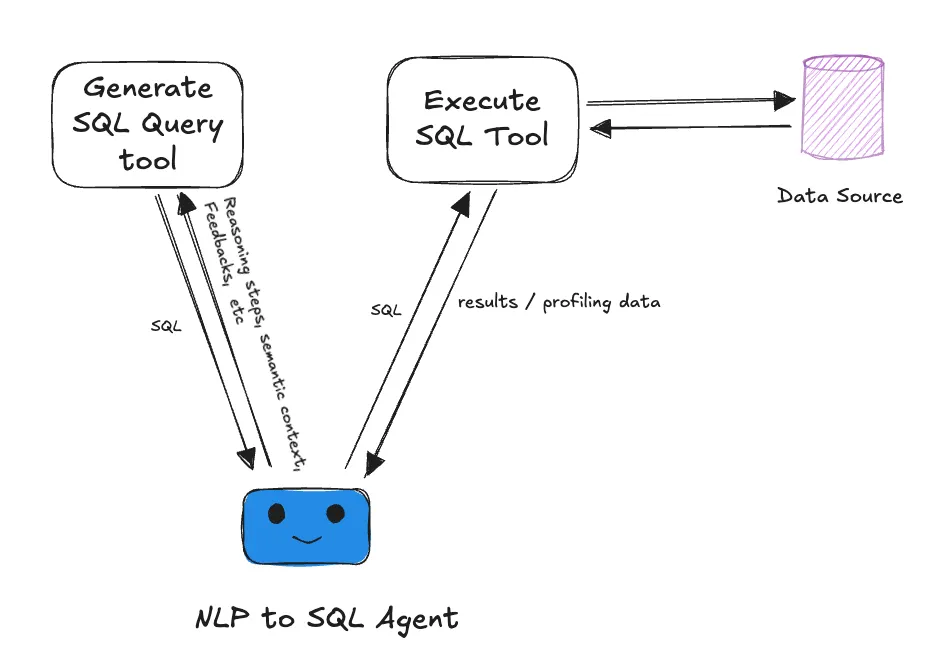 Finally, what makes the entire architecture powerful is the agent equipped with a prompt that effectively explains the business context.
from langgraph.prebuilt import create_react_agent
from langgraph.checkpoint.memory import MemorySaver
memory = MemorySaver()
AGENT_PROMPT = """
You are a helpful assistant that can generate a SQL query based on the user's question and semantic context.
You can also execute a MySQL query and return the result.
here is the semantic context you can use to understand the business and generate the query:
{semantic_context}
Take the following steps to provide the answer:
1. write reasoning steps to approach the question.
2. generate the sql query based on the reasoning steps.
3. if you want to profile any column before you executing the query to add the correct filter, for example if there is a status column, you can run DISTICT query on that column to get the unique values and then use that to add the correct filter.
4. execute the sql query and return the result (please add max limit of records as 100 to the query before executing it, otherwise it may go out of LLM context window).
5. if the result is not what you expected, please write the new reasoning steps and generate the new sql query and execute it again.
Expectation:
- try to give the data in a table format.
- don't hallucinat, just give the answer always based on the information available in the source.
- if the information is not present in the db or the result is empty, please inform that to the user rather than hallucinating.
- if you don't have enough information to generate the query, ask for more information from the user.
"""
model = ChatOpenAI(model="gpt-4.1", temperature=0.0)
sql_agent = create_react_agent(
name="sql_agent",
model=model,
tools=[generate_sql_query, execute_mysql_query],
prompt=AGENT_PROMPT,
checkpointer=memory,
)
In this case, we’re using a Langgraph based agent. However, we firmly believe that agents built on any architecture can adopt this approach as long as we address the following three key factors,
1. LLM
Regardless of the architecture, LLMs serve as the brain of the agent. Choosing a more capable LLM will yield better results.
We’ve tested this architecture with OpenAI’s and Anthropic’s most advanced frontier models. However, we believe that a decent model with good intelligence and reasoning capabilities should be sufficient to make this work.
2. Memory
In this case, Langraph’s inbuilt checkpointer feature simplifies memory implementation. A good long-term memory aids your agent’s improvement over time, while a good short-term memory enables it to retain previous messages and address follow-up questions effectively.
3. Prompt
Prompt is very important here, especially the instruction we give decides the way agent works. For instance, you can leverage the power of data profiling is enabled just by adding one single line
“3. if you want to profile any column before you executing the query to add the correct filter, for example if there is a status column, you can run DISTICT query on that column to get the unique values and then use that to add the correct filter.”
As the prompt suggest, this will help you to know some details about the data before even you generate the actual final query.
That wraps the exploration of a powerful agentic architecture to enable NLP to SQL. I hope, that unlocks many potential for any business processes you’re trying to automate.
Github repository: https://github.com/vithushanms/agentic-nlp-to-sql.git
Let’s stay connected: https://www.linkedin.com/in/msvithushan/
Share Blog




READY TO BEGIN
Build AI Around the Way Your Teams Work
Start with one role, one workflow, and one measurable outcome.
Talk to an Expert