
Home / Blog / Unlock the Power of Visual Data: Elevate RAG Workflows
Unlock the Power of Visual Data: Elevate RAG Workflows with Landing AI’s Agentic Document Extraction
Vithushan Sylvester
Chief Architect

Landing AI, a company known for its computer vision platform, has recently introduced Agentic Document Extraction, a sophisticated tool designed to revolutionize PDF parsing. This AI-powered feature is tailored to extract structured information from documents with diverse layouts, going beyond simple text extraction to handle complex document structures, including images, charts, and tables.
How It Works?
Agentic Document Extraction leverages advanced AI to provide intelligent document understanding, which includes structure analysis, visual grounding, and visual data recognition. This means it can analyze the layout of a document, pinpoint the exact locations of visual elements and text, and recognize data from charts and tables, ensuring comprehensive and accurate processing across various formats.
Key features
Complex Layout Extraction: Captures intricate details beyond basic OCR, such as checkboxes and form layouts, making it ideal for processing medical forms, financial reports, and other complex documents.
Accurate Extraction of Images and Charts: Eliminates errors common in text-only analysis by extracting data from visual elements, enhancing precision for industries relying on detailed document insights.
Visual Grounding: Links extracted data back to its source location in the document, enabling answer verification and building trust through transparent, traceable AI-generated insights.
Comparison with Other PDF Parsing Techniques
Traditional PDF parsing techniques often rely on simple text extraction using libraries like PyPDF2 or PDFMiner, which may struggle with complex layouts or images. OCR-based methods, such as those using Tesseract, can handle scanned PDFs but might not understand the context or layout effectively. Cloud-based services like Amazon Textract and Parseur also offer AI-powered document parsing, but Landing AI’s approach stands out with its agentic workflow. This workflow employs AI agents to reason and connect document components, providing a more nuanced understanding compared to template-based extraction in tools like Parseur or the general-purpose extraction in Amazon Textract.
Agentic Document Extraction’s ability to handle complex layouts and provide visual grounding makes it particularly suitable for documents with visual elements, potentially offering higher accuracy and versatility for industries dealing with diverse document types.
However, there were several specialized vision language models already there. for example, colpali, colqween, etc.
Comparison with ColPali and ColQwen
Agentic Document Extraction differs from ColPali and ColQwen, which are focused on document retrieval and finding relevant pages based on user queries rather than extracting detailed data. While Agentic Document Extraction provides structured outputs like text and tables, ColPali and ColQwen use Vision Language Models to create visual embeddings for efficient matching, better suited for search tasks.
Key Differences
Purpose: Agentic Document Extraction extracts data for processing, while ColPali and ColQwen retrieve documents for queries.
Approach: Agentic Document Extraction uses an agentic workflow for understanding, while ColPali and ColQwen rely on late interaction for retrieval.
Output: Agentic Document Extraction delivers structured data, whereas ColPali and ColQwen return relevant document pages.
An interesting find is that ColPali and ColQwen, both part of the ColVision family, use different underlying models (PaliGemma for ColPali, Qwen2-VL for ColQwen), which might affect their performance and integration needs compared to Agentic Document Extraction’s API.
How to get started with Agentic Document Extraction?
Landing AI provides APIs for Python, JavaScript, and curl to interact with Agentic Document Extraction.
Below is a sample Python code to demonstrate how to use their API for document extraction.
import requests
url = "https://api.va.landing.ai/v1/tools/agentic-document-analysis"
files = {
"image": open("{{path_to_file}}", "rb")
OR, for PDF
"pdf": open("{{path_to_file}}", "rb")
}
headers = {
"Authorization": "Basic {{your_api_key}}",
}
response = requests.post(url, files=files, headers=headers)
print(response.json())
This example shows how to send a PDF file to the API and retrieve the extracted data in JSON format, which can be further processed based on your needs.
But apart from these, you can also think of leveraging the direct tools using the python library for any of your custom implementations.
For example,
import vision_agent.tools as T
import matplotlib.pyplot as plt
image = T.load_image("people.png")
dets = T.countgd_object_detection("person", image)
visualize the countgd bounding boxes on the image
viz = T.overlay_bounding_boxes(image, dets)
save the visualization to a file
T.save_image(viz, "people_detected.png")
display the visualization
plt.imshow(viz)
plt.show()
Checkout the documentation on available tools to know more about it.
Apart from this you can also try the hosted version of this here: https://va.landing.ai
How to fit this into your RAG?
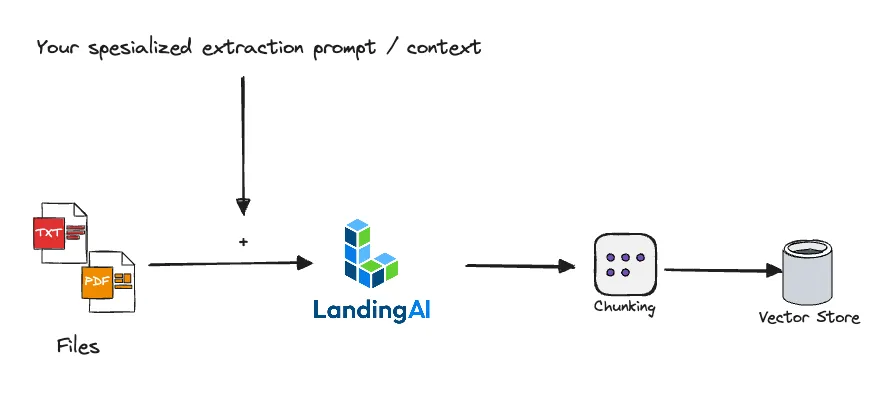
As the diagram demonstrate, either the Landing AI agentic document extractor API or the tools can be plugged into your own RAG in the process of parsing.
Conclusion and Recommendations
For users seeking a PDF parser with advanced AI capabilities, Landing AI’s Agentic Document Extraction is likely the best choice due to its intelligent document understanding and versatility across industries. It offers significant advantages for handling complex documents, but users should be prepared for potential API setup. The provided Python code example can serve as a starting point, though exact API details may need to be obtained from Landing AI’s web-based app or documentation. Along with the access to direct tool usage from Landing AI helps you to build your very own extraction pipeline.
Share Blog




READY TO BEGIN
Build AI Around the Way Your Teams Work
Start with one role, one workflow, and one measurable outcome.
Talk to an Expert